Version v2.4.3

Version 2.4.3 introduces OTIF Retention - a new measure of the durability of development work, showing how much of the code that was produced remains in the repository after 1, 7, 30, and 90 days. The indicator is available on the Participant, Team, and Project views and in tabular reports, giving teams and management a consistent picture of how much of the effort invested actually stays in the product. The release also expands control over the quality of analytical data - with the ability to exclude selected files from Coding Calories calculation - and adds Gitea as another repository source.
Below you will find a detailed description of the most important changes.
New Features
OTIF Retention
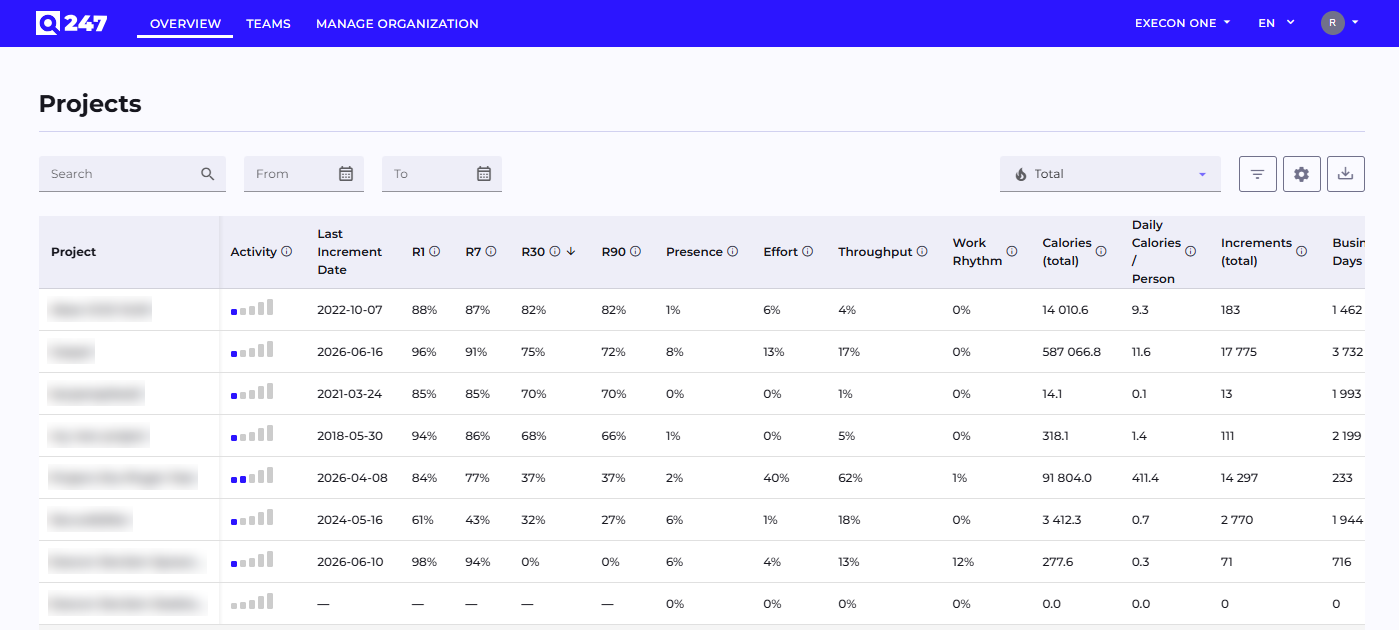
Q247 introduces OTIF Retention - a new measure showing how much of the code that was produced actually remains in the repository after a given amount of time. For four periods - 1, 7, 30, and 90 days (R1/R7/R30/R90) - the indicator reports the percentage of lines from a given commit that survived to that point. High retention means the work is durable and genuinely builds the product, while low retention points to temporary code that is repeatedly rewritten or quickly removed - giving teams and management a new, objective dimension for assessing contribution, alongside the sheer number of changes.
The indicator is available as a dedicated component with a date range selector on the Participant, Team, and Project views, presenting the R1/R7/R30/R90 values for the selected person, team, or project. The same values appear as columns in tabular reports - of projects (Overview, Participant), teams (Teams), and participants (Project, Team) - allowing the durability of work to be compared and sorted across the entire organization; 30-day retention is shown by default, and the remaining periods can be enabled in the table settings. Values are presented on a color scale from lowest to highest retention, so strong and weak areas are visible at a glance, and the measurement remains correct regardless of how branches are worked with (merge, squash, rebase, cherry-pick).
Retention data is calculated by the Enterprise Plugin, so the indicator begins to fill in once it is updated to the latest version. Retention is also calculated for earlier commits, so the historical picture of work durability is available immediately, with no waiting.

Excluding Selected Files from Coding Calories Calculation
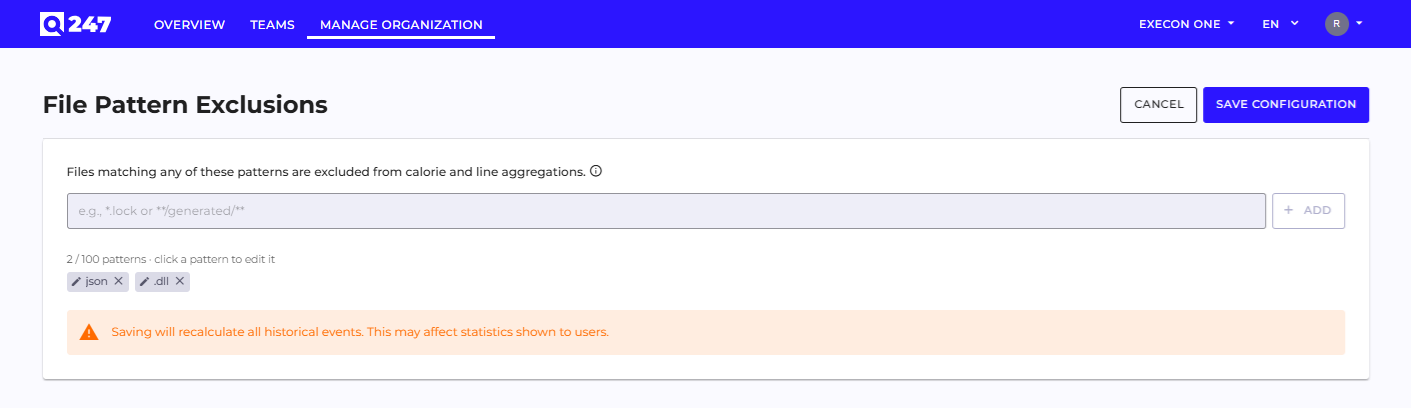
An organization administrator can now specify which files should be skipped during contribution analysis - for example automatically generated files, dependencies, or generated code that distorts the metrics. The configuration is available in the Manage Organization → Configuration panel, where the administrator defines any number of file name or path patterns and can freely add, edit, and remove them. Files matching any pattern are not counted toward Coding Calories or the line count - both in aggregates and on charts; a commit containing both excluded and other files is counted partially, while commits composed solely of excluded files disappear from statistics and analytical views. A change to the patterns takes effect immediately after the configuration is saved. The feature requires updating the Enterprise Plugin to the latest version - it is the plugin that scans the files in commits while applying the defined exclusions.
Gitea as a New Repository Source
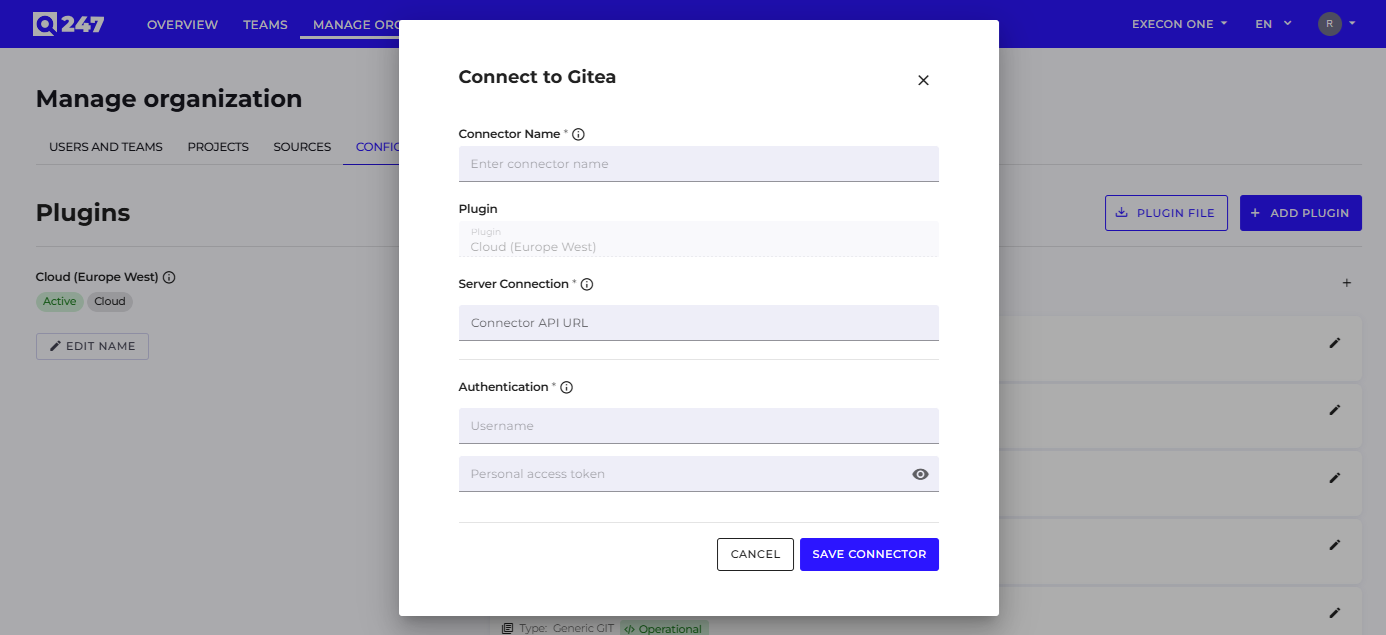
Gitea joins the supported repository sources - both the cloud and self-hosted versions - which the administrator adds in the Manage Organization → Sources panel, authenticating the connection with a username and an access token (Personal Access Token). Gitea repositories are scanned on the same terms as the other sources, so all metrics and analyses work for them without any difference.
History Transfer When Changing a Repository's Project
After a repository is reassigned to a different project, its existing activity history moves along with it, preserving the rules that route data to the correct projects. As a result, reports stay complete and consistent with the configuration, without manual data cleanup.
Improvements
Automatic Activation Email on Granting Access
After a user is granted access or an account is created, the system automatically sends an activation message - with a password-setup link for new accounts, or a login link for people who already have a password. The account form shows a note that such a message will be sent, provided automatic notifications are enabled.
AI Assistant in the Interface Language
AI Assistant responses now match the language set in the interface, so the user receives analysis in their own language without any additional configuration.
Clearer Account Status
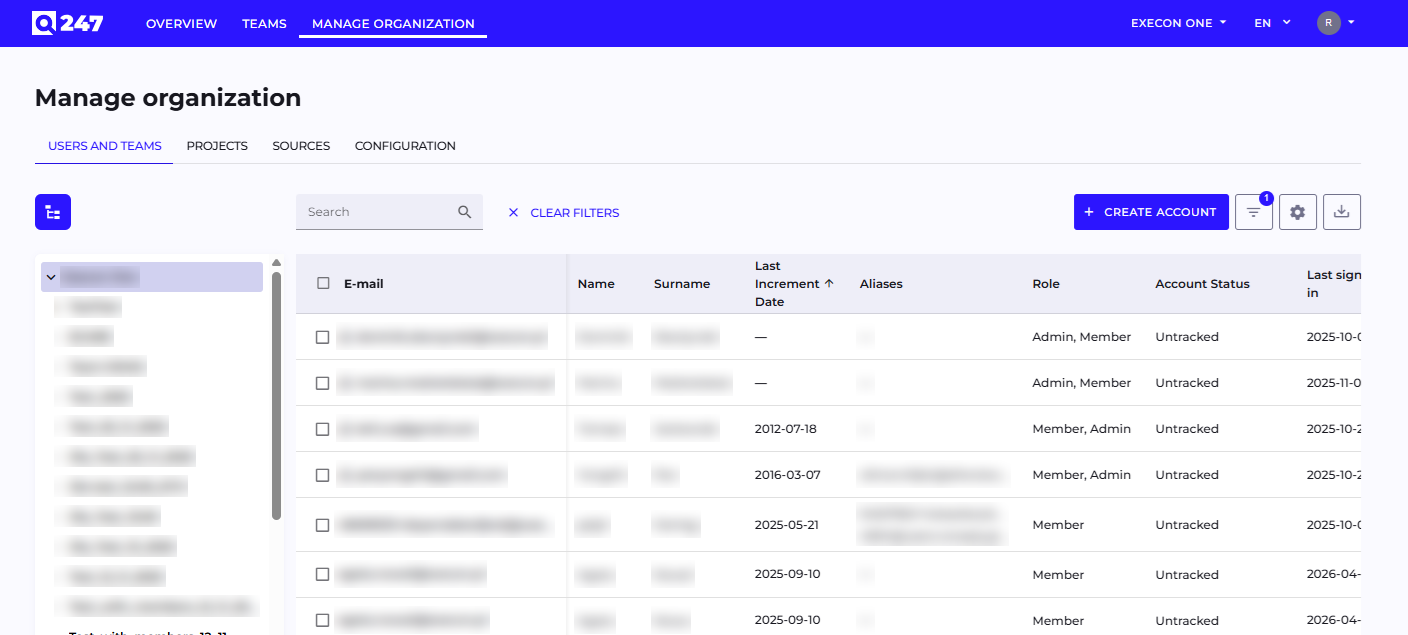
The account status previously labeled "Technical" is now named "Untracked" (Polish: "Pomijany"), which more clearly communicates that the activity of such an account is omitted from analysis.
Clearer Tooltips
The content of the tooltips describing metrics and commit markers has been updated, including a new description for the cherry-pick marker, making it easier to understand how individual values are interpreted.
Consistent Dropdowns and Filters
The appearance of dropdown lists and the way values are presented in filters have been unified, so that interacting with filters and selection fields is consistent across the entire product.
More Stable Work Item Synchronization
Fetching related work items during repository scanning has been improved, so synchronization runs stably and without errors interrupting it.
Bug Fixes
- Selected filters are once again visible in the table filtering field.
- The message of empty commits and of those created through cherry-pick and revert is no longer lost or truncated.
- Exporting tables to a CSV file now works in the Safari browser as well.
- The correct range of email addresses in the "others" tooltip on the Team view.