AI Adoption
The Configuration section responsible for data on AI tool usage: commit recognition patterns, the visibility toggle, and mapping accounts from telemetry. The charts themselves and how to read them are described in AI Adoption in the Features section.
The purpose of the module is to replace declarations and license counts with measurable data: how much work was produced with AI involvement, how many people actually use it, how much it costs, and whether changes made with the help of AI stay in the code.
Two data sources, two different requirements
The choice of source determines how much work the deployment requires.
| Source | What it provides | What it requires |
|---|---|---|
| Commit recognition | splits Calories and commits into those produced with AI and without | nothing, it works on data Q247 already collects |
| AI tool telemetry | work time, token count, cost, number of generated lines | telemetry export in the AI tool and the Enterprise Plugin |
The first source relies on recognizing, in commit messages, trailers that indicate AI tool involvement, for example Co-Authored-By: Claude. It requires no integration or changes to repositories. If you only care about the proportion of work done with AI, it is enough to turn on visibility and stop there.
The second source is telemetry in the OpenTelemetry standard, reported by the AI tool. It accounts for costs and token usage, and its deployment, variants, and prerequisites are described in AI tool logs in Integrations.
Both sources are joined at the user level, by email address. This is why account mapping is a separate deployment step, and without it, telemetry has no account to attach to.
Commit messages as a data source
This source works on data Q247 collects anyway, so it depends solely on the content of the commit message.
Pattern matching
Q247 searches the commit message (its title and body, including the footer) for text from the pattern list. Matching rules:
- Text fragment: the pattern matches when it occurs anywhere in the message. It does not have to start or end a line.
- Case insensitive:
Co-Authored-By: Claudeandco-authored-by: claudematch the same way. - First match decides: patterns are checked in the order of the list, and the commit gets the tool label from the first matched pattern. A commit tagged by two tools at once is therefore assigned to only one of them.
- Any text after the pattern does not interfere: the pattern
Co-authored-by: Copilotalso matches the lineCo-Authored-By: Copilot GPT 4.5, so appending the model name and version does not break recognition.
A pattern can also be a regular expression, if a plain text fragment is not enough.
Trailers recognized by default
| Tool | Pattern |
|---|---|
| Claude Code | Co-Authored-By: Claude |
| Claude Code | Generated with Claude Code |
| GitHub Copilot | Co-authored-by: Copilot |
| Cursor | Co-authored-by: Cursor Agent |
| Aider | Co-authored-by: aider |
| Devin | Co-authored-by: Devin AI |
| OpenAI Codex | Co-authored-by: Codex |
Most of them are standard Git trailers, that is lines in the commit message footer, appended automatically by the tool.
Enforcing the trailer in AI tool instructions
AI tools do not always append the trailer, and not all of them do. A commit without a trailer looks to Q247 like an ordinary human commit, so every such case understates the share of work done with AI. The most reliable solution is to add this requirement to the main prompt (the file with instructions for the tool, for example CLAUDE.md or copilot-instructions.md), so that it applies in every repository:
## Git workflow
Every commit message MUST end with a blank line followed by the `Co-Authored-By` trailer. Append the model type and version after `Copilot` (e.g. `GPT 4.5`):

Co-Authored-By: Copilot GPT 4.5

No exceptions. This applies to version bumps, hotfixes, and one-line commits.
Appending the model name and version after the tool name is also beneficial: the pattern still matches, and the repository history itself retains the information on which model made the change.
Patterns are also applied to commits already collected, so the split between work with AI and without appears immediately after turning the feature on, without waiting for new commits. Adding a pattern later recalculates the history again.
Settings in Q247
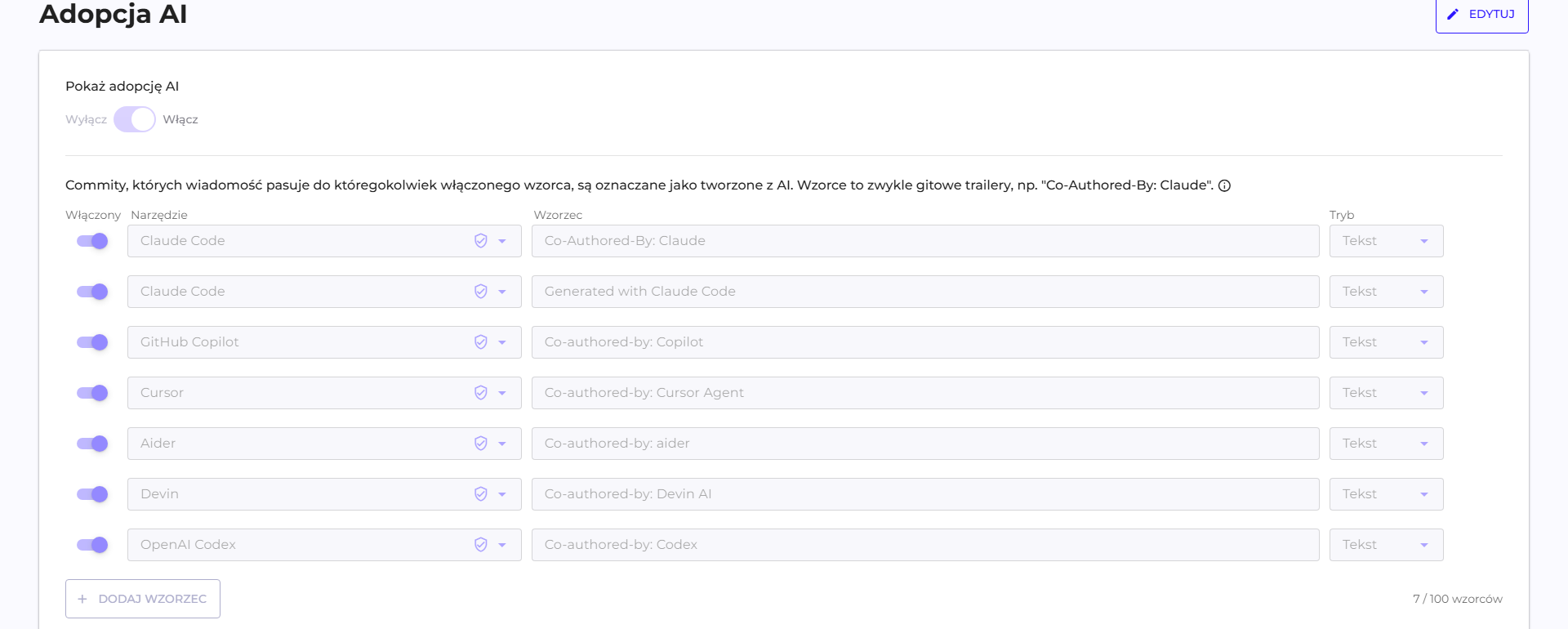
The visibility toggle
The "Show AI adoption" toggle controls the visibility of the widget on the dashboards. Data collection works independently of it: while the toggle is off, data still flows in and is processed, and the widget stays hidden. Turning it on later therefore also shows the history.
Pattern table
The pattern table is an editable list of the trailers described above. The columns are the tool, the text pattern, and an activity toggle, and the default entries can be turned off or changed.
It is worth extending the list if the team uses a tool outside the default seven patterns or applies its own tagging convention. This requires no changes on the repository side.
| Limit | Value |
|---|---|
| Maximum number of patterns | 100 |
| Order | matters, the first match wins |
Mapping accounts from telemetry
The AI tool identifies the user by the email address configured locally on their computer. This address is not always the same one the person's account has in Q247, and without a match, telemetry has no account to attach to.
Matching addresses are mapped automatically and require no action. The "Unmapped AI tool users" section shows cases that need attention, in two categories:
| Category | What it means | What to do |
|---|---|---|
| Unmatched address | telemetry arrived, but could not be linked to any Q247 account | point out the link manually |
| Address without data | a link exists, but no telemetry has been recorded from this address | check whether the address contains a typo |
The "Go to Users and teams" shortcut leads directly to account mapping, described in Users And Teams.
Right after launch, the list of unmatched addresses is incomplete, because telemetry is only just starting to come in. Reviewing it after one or two business days saves you from repeating the same work.
Verification
- Commit patterns: the split between work with AI and without should appear immediately, because it works on historical data.
- Telemetry: the timing of the first data depends on the variant, and it is described in AI tool logs.
- List of unmatched addresses: review after one or two business days and complete the links.
- Addresses without data: an entry remaining in this category after a few days points to an error in the address, not to a lack of activity.
See also
- AI tool logs: telemetry deployment, variants, and prerequisites
- AI Adoption: the widget and how to interpret the data
- Users And Teams: mapping addresses from telemetry to accounts
- Language model: the integration behind the AI Assistant
- Excluding commits: what is not included in the calculations