Flow Metrics (Lead Time / Cycle Time)
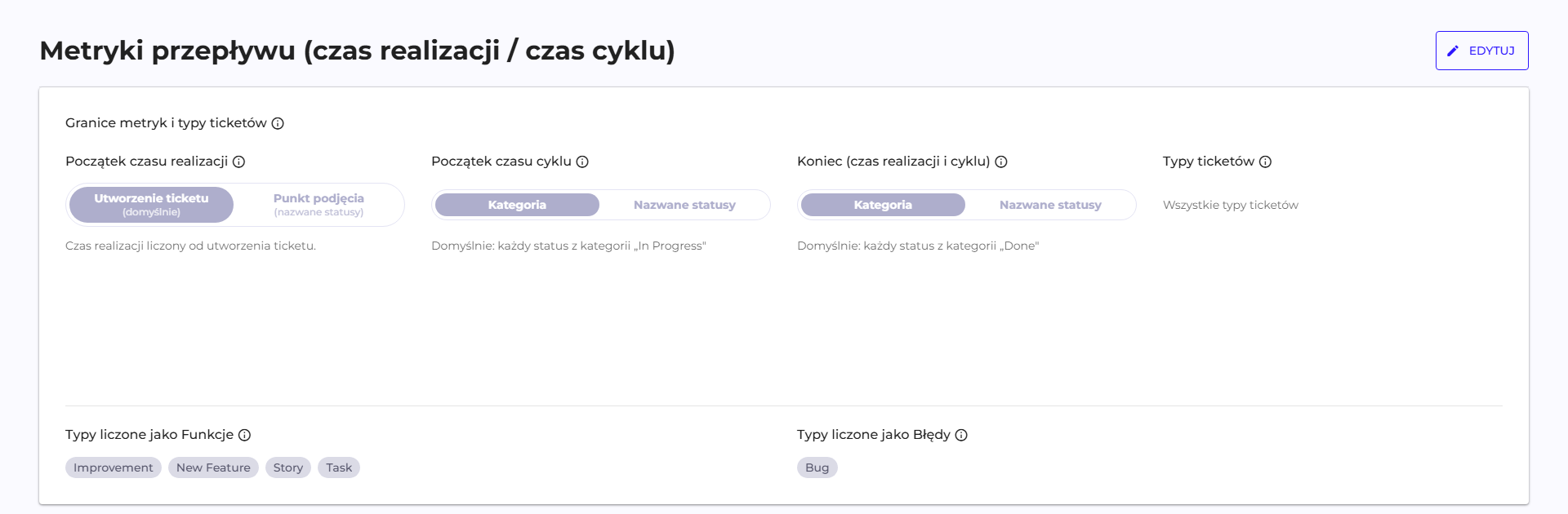
In the interface, the section is named "Flow Metrics (Lead / Cycle Time)" and sets global boundaries, inherited by all projects unless a project has its own override (see Projects). There is no toggle to turn the feature on: the section appears once the organization has an integration with a ticketing system.
Fields and default values
An organization that has never touched this section still has Lead Time and Cycle Time calculated correctly, because all boundaries have default values based on Jira's native status categories.
| Field | Default | What it means |
|---|---|---|
| Lead Time start | Ticket creation | Lead Time is counted from the ticket's creation date, so it also includes queue waiting time. |
| Cycle Time start | "In Progress" category | Cycle Time starts on the first entry into any status from this category, for example In Progress, In Review or In Development. |
| End (Lead & Cycle) | "Done" category | Both times end on the first entry into any status from the Done category, for example Done, Closed or Deployed. |
| Ticket types | empty, meaning "All ticket types" | No filter: tickets of every type are included in the metrics. |
| Flow distribution categories | Improvement, New Feature, Story and Task as Features, Bug as Bugs | An initial proposal for the split, on which the Flow distribution widget is based. |
An alternative to Lead Time start is Commitment point, that is a list of named statuses; the metric then starts on the first entry into any of them. For the other two boundaries, the alternative is Named statuses.
The split into Features and Bugs
Ticket type names belong to the Customer's ticketing system, so Q247 does not recognize them automatically: Story, Historyjka or Sub-task are, to the platform, plain strings. Flow distribution splits tickets into Features and Bugs based on assigning type names to one of these two groups, and the initial proposal covers Jira's default English names: Improvement, New Feature, Story and Task as Features, and Bug as Bugs.
An organization with its own or translated type names must fill in this list, because matching is done on the literal name. The remaining rules:
- A type not assigned to either group, for example Epic or Sub-task, is reported as Other, so the split always adds up to Flow velocity.
- The same type cannot belong to both groups at once; saving such a configuration is rejected.
- Case does not matter for matching.
- This grouping is applied at read time, so a change to it takes effect immediately and does not recalculate history.
Overriding it for a single project
A project that uses different type names from the rest of the organization can have its own split. You set it in Manage Organization → Projects, after opening the project, on the Flow Metrics tab, in the Flow distribution categories section. The Inherit or Override switch decides whether the project uses the organization's setting, and the Types counted as Feature and Types counted as Bugs fields take their own lists.
An override comes with three limits:
- An override replaces the organization's setting in full. You cannot override just the features and inherit the bugs.
- The resolution order is: the project's own setting, then the organization's setting, and when there is neither, the starting proposal described above.
- The tab appears only when the organization has a ticketing system connected.
Status category versus named statuses
This distinction determines whether the results are correct, and it does not follow from the field names alone.
Status category is a group maintained by Jira, and covers multiple statuses at once. The "In Progress" category will therefore also catch statuses named "In Review" or "In Development", not only the one literally named "In Progress". For most organizations this is the right choice, because it does not require an update every time the process changes in Jira.
Named statuses are specified directly, and then they replace the category rather than adding to it. If you provide a list of statuses, the category is no longer taken into account. This variant is useful when the process in Jira has statuses assigned to categories in a way that does not match the actual moment work is picked up or finished.
Jira Data Center instances allow leaving a status without a category ("No Category"). Such a status will never match a category boundary, so a ticket that passes through it will not get either a start or an end of measurement at that point. If the process has such statuses, set the boundaries using named statuses or fill in the categories on the Jira side.
Effects of changing the settings
| Change | What happens |
|---|---|
| Change of the start or end boundary | metrics are recalculated retroactively, across the whole history |
| Change of a project override | the same recalculation, because the project boundary replaces the organization boundary |
| Change of the ticket type list | only filtering at read time, no recalculation |
| Change of the Features and Bugs split | only grouping at read time, no recalculation |
The recalculation runs on the history of status changes that Q247 already has stored, so it does not require fetching data from Jira again. On a large organization it still takes some time, so it is worth settling the boundaries once, after talking to the people responsible for the process, rather than adjusting them by trial and error.
The whole section requires an integration with Jira. More about the metrics themselves in Flow Metrics.